all work
03Medara HMIS
view the prototype ↗
case study · product design · ui/ux · healthtech · 2026

Medara
HMIS

Designing a hospital management system around clinical workflow instead of database structure.

Problem
Hospital software structured around database tables forces clinical staff to switch screens constantly during high-stress ward shifts.
My role
Workflow research, 12-module IA, clinical design system, and high-fidelity UI specs; production engineering with the TechFrien team.
Timeline
Apr 2026 – Jun 2026 · 8 weeks
Outcome
Standardized a longitudinal patient record reducing OPD encounter creation to 3 clicks in high-fidelity prototype.

01Context

A Hospital Management Information System (HMIS) is the digital backbone of a healthcare institution — coordinating patient registration, doctor consultations, IPD admissions, bed occupancy, pharmacy dispensing, billing, and clinical administration across every department.

Medara is TechFrien’s flagship connected healthcare suite: twelve modules operating on a single longitudinal patient record, engineered for Indian hospitals, clinics, and nursing homes. This case study covers the core product design — from daily operational command to granular clinical encounters.

Working assumption, drawn from published HMIS product documentation and demo walkthroughs rather than from fieldwork: most systems are structured department-by-department, which pushes staff into re-entering the same patient across siloed screens. Validating this with clinical staff is the first item in “what I would do next” — until then it is a premise, and I have designed against it as one. Medara was conceived to invert this model: one connected patient record, accessible seamlessly by every department across the entire lifecycle of a shift.

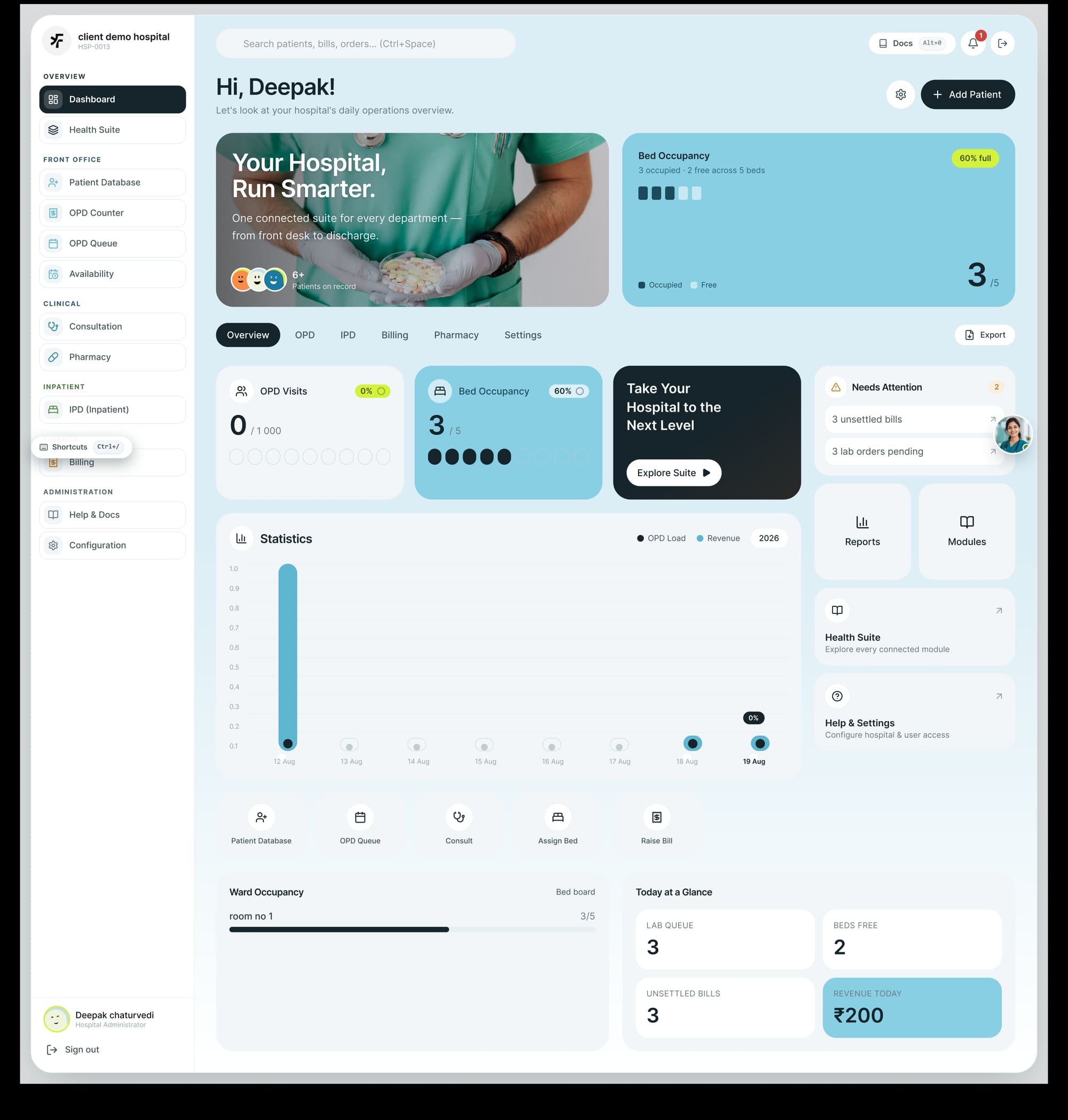
Medara HMIS Operations Dashboard — hospital greeting, bed occupancy tracker (3/5 beds full), module quick filters, key operational statistics, and priority action alerts.
The Medara Operations Dashboard — high-level clinical overview with real-time bed occupancy, search shortcut (Ctrl+Space), department filters, priority alerts, and daily metrics.

02The challenge

Hospital staff operate under intense time pressure and high cognitive load. A nurse checking bed allocations, a doctor writing an encounter prescription, and a billing clerk clearing an OPD slip cannot afford confusing navigation or ambiguous interface states.

  • Information density without cognitive overload. Clinical data cannot simply be hidden behind hamburgers or deleted to make a screen look “minimal”. Essential patient history, drug allergies, and active vitals must remain instantly scannable.
  • Many specialized roles, one unified record. Front-desk receptionists, triage nurses, attending physicians, lab technicians, and hospital administrators all work on the same patient with completely different daily tasks.
  • High-stress environmental constraints. Shared terminals, high ambient glare, noisy ward stations, and frequent mid-task interruptions.
A nurse does not need fewer fields. She needs to know which three of the forty matter right now — allergy, active diagnosis, last vitals. Those three are the only ones set in bold at 16px; the other thirty-seven are 14px and grey.

03The modular architecture

To support hospital-wide operations without disorienting users, Medara organizes its twelve core modules into clearly delineated operational layers with a persistent role-aware navigation rail.

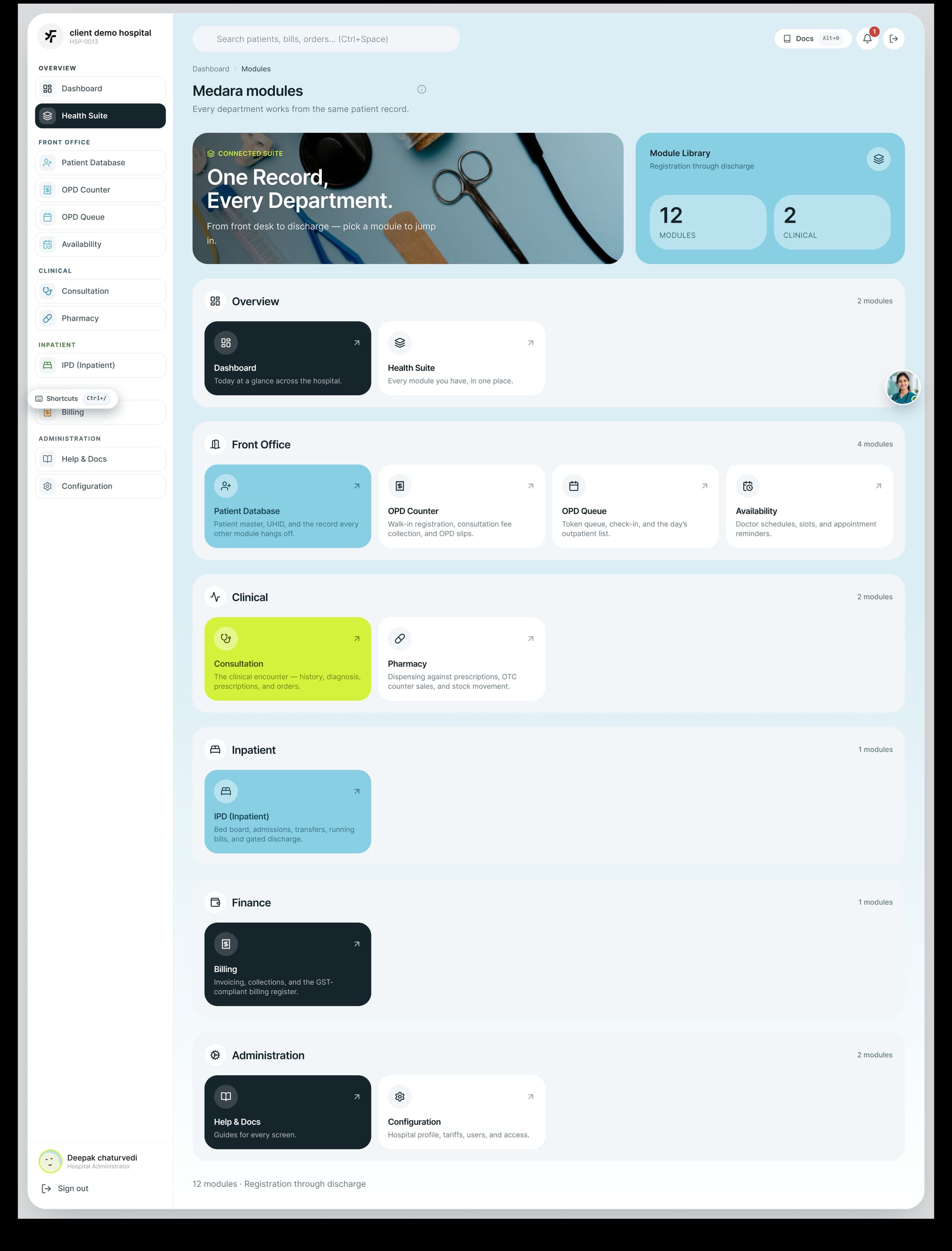
Medara Health Suite Modules Index — Overview, Front Office, Clinical, Inpatient, and Administration modules connected on one master record.
The Health Suite module index — providing direct jumping points to Front Office, Clinical, Inpatient, and Administration workflows.
01. Operations DashboardExecutive overview of hospital census, live bed occupancy (e.g. 60% full / 3 occupied, 2 free), OPD visit volume, and high-priority alerts.
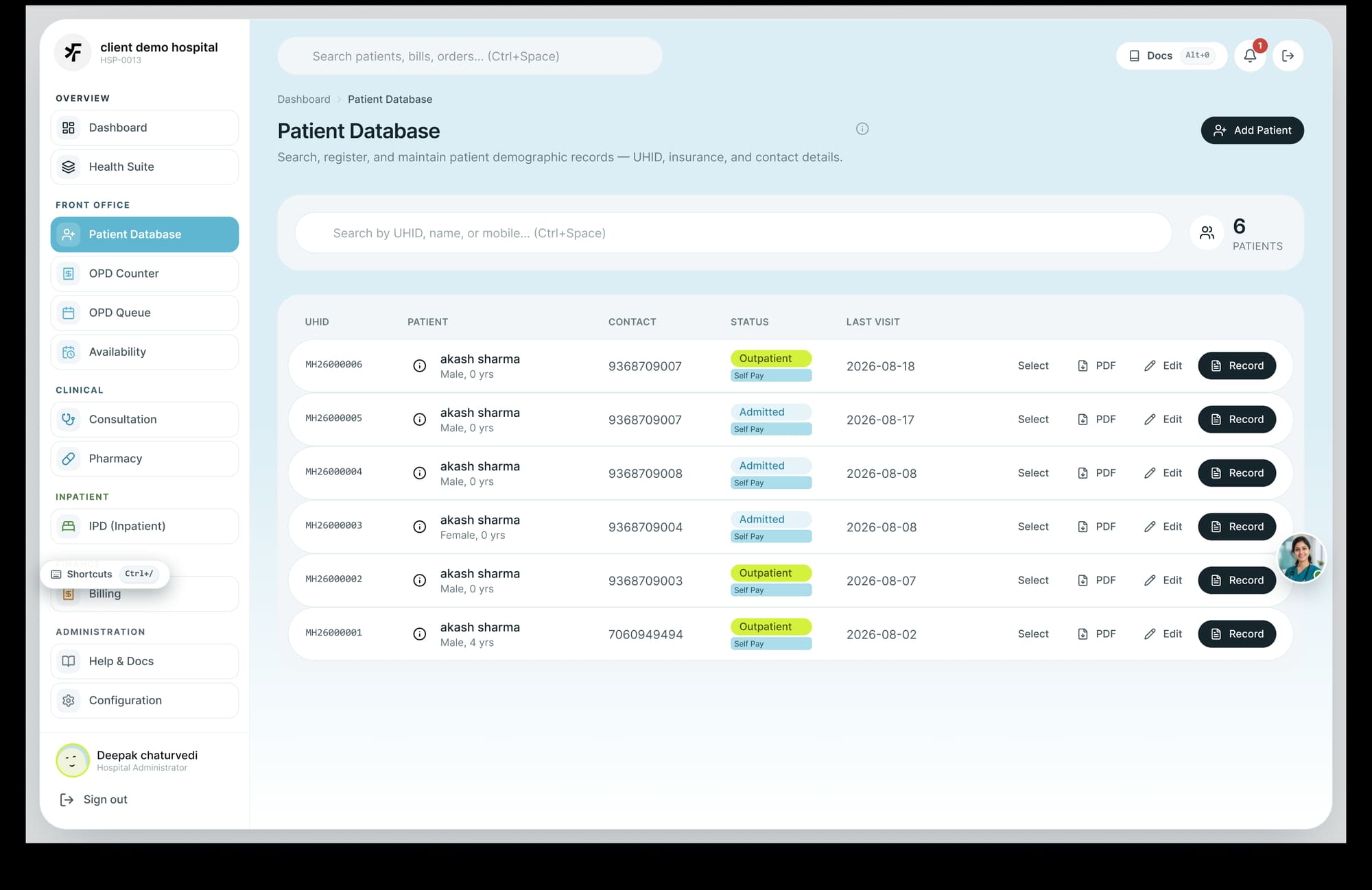
02. Patient DatabaseCentral master registry: UHID search, demographics editing, longitudinal medical history, and encounter tracking.
03. OPD Counter & QueueWalk-in registration, fast consultation fee collection, token generation, and wait-time queue monitoring.
04. Availability & SchedulingDoctor shift rosters, OPD room allocations, duty schedules, and specialty coverage calendar.
05. Clinical ConsultationPhysician encounter surface: chief complaints, diagnosis coding, active problem lists, e-prescriptions, and diagnostic orders.
06. Pharmacy & DispensingPrescription validation, counter sales, batch/expiry alerts, automated drug substitution warnings, and stock movements.
07. IPD (Inpatient & Wards)Admission workflows, ward & bed management, nurse round charting, vitals recording, and discharge clearance.
08. Billing & Fast CashierGlobal keyboard-accessible billing (Ctrl+/), itemized billing summaries, settlement tracking, and refund processing.
09. Laboratory & DiagnosticsSample collection barcodes, automated analyzer integration, reference range validation, and verified report sign-offs.
10. Radiology & PACSImaging study scheduling, DICOM viewer links directly tied to the encounter record, and structured radiological notes.
11. Reports & AnalyticsDaily revenue, department-wise load statistics, bed turnover rate, and statutory NABH quality indicators.
12. Administration & ConfigUser role-based access control (RBAC), audit logs, department configuration, and system documentation.
04Clinical workflow & patient records

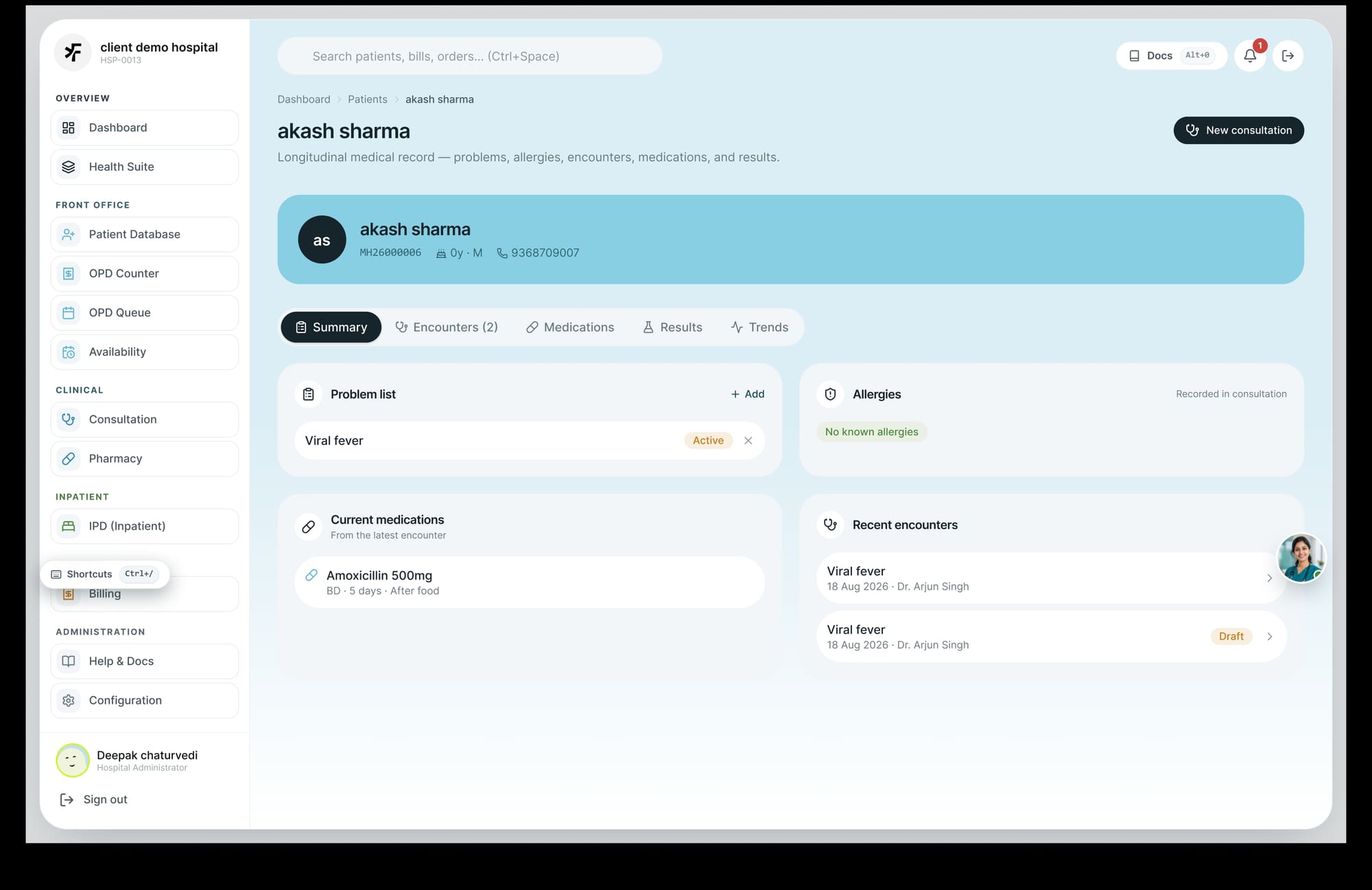
The heart of Medara is the longitudinal patient record. When viewing a patient (e.g., Akash Sharma — UHID MH26000006), the interface consolidates all clinical data into a persistent summary card with structured diagnostic tabs.

Medara Longitudinal Patient Record — Active problem list, allergy banners, current medications (Amoxicillin 500mg), and recent encounter history.
The Longitudinal Patient Record — allergy banners at the top, active diagnosis summary, medication orders, and chronological clinical encounters.

Patient onboarding and demographic maintenance use focused slide-over modals that validate national identifiers (Aadhaar, ABHA / PMJAY numbers), emergency contacts, and insurance categories without navigating away from the current patient context.

Edit Patient Demographics Modal — quick registration form with structured fields for name, DOB, gender, blood group, mobile number, and address.
Patient Demographics slide-over form — allowing front-desk receptionists to edit contact information, national IDs, and emergency contacts with one click.

05The design system

A rigorous, systematic design language built in Figma to ensure visual consistency, accessibility, and high contrast in demanding clinical settings.

Typography

Primary interface face: Inter — selected for its exceptional legibility, high x-height, and neutral geometry. Supporting monospace: IBM Plex Mono for error-free transcription of patient UHIDs, dosage numbers, and lab values.

AaInter
Inter

Clean, modern, and readable sans-serif optimized for digital healthcare interfaces. Provides clear letter distinction (e.g. cv05 disambiguating “l” from “1” in medication names).

400 / 500 / 600 / 700SemiBold headingsRegular body text
01IBM Plex Mono
IBM Plex Mono

Used for all character-critical clinical identifiers, timestamps, dosages, and monetary figures. Fixed-width tabular digits allow effortless vertical column alignment during quick scanning.

400 / 500slashed zerotabular numerals
Aa32 / Heading 1
Aa24 / Heading 2
Aa20 / Heading 3
Aa16 / Body text
Aa14 / Caption & UI
0112 / Mono meta

Color palette & semantic tokens

The color system is organized around role-based clinical significance. High contrast ensures readability across varied workstation displays.

Primary Navy#112233Sidebar, primary buttons
Medical Blue#3B82F6Active highlights, primary CTAs
Soft Ice#E6EFF8Module background tint
Surface Light#F0F6FCCard containers, table rows
Success / Active#22C55ECompleted status, stable vitals
Pending / Warning#F59E0BPending lab orders, attention
Critical / Alert#EF4444Allergies, emergency alerts
Slate Muted#4E5A69Labels, secondary metadata
Border Line#E2E5E9Hairlines, component dividers

06UI decision records

Every key architectural decision made during the Medara HMIS interface design process.

UI-01

Global patient search as the universal primary action

Context
Clinical staff switch between patients dozens of times per hour across different departments.
Decision
Positioned an omni-search input permanently in the header with a global hotkey (Ctrl+Space) supporting name, UHID, and phone number lookup.
Rationale
Eliminates repetitive navigation and allows instantaneous patient context switching from anywhere in the platform.
Trade-off accepted
Occupies permanent real estate in the top application bar.
UI-02

Visual bed occupancy tracking with color-coded density

Context
Ward administrators need instantaneous clarity on ward capacity without reading through raw tabular logs.
Decision
Created a dedicated Bed Occupancy widget combining numerical fraction (e.g. 3/5), percentage badge (60% full), and a tactile grid representation of occupied vs free beds.
Rationale
Provides instant visual feedback in triage situations and during morning shift handover meetings.
Trade-off accepted
Takes up a prominent card position on the executive dashboard.
UI-03

Triple-encoded clinical status tags

Context
Monitors in hospital corridors and busy nurse stations often suffer from color distortion and glare.
Decision
Every status tag combines color, a filled geometric indicator dot, and explicit uppercase text (e.g. ● Completed, ● In Progress, ● Pending, ● Cancelled).
Rationale
Guarantees instant comprehension for color-blind users and under severe glare or monochrome printouts.
Trade-off accepted
Requires slightly more horizontal space inside tables and cards.
UI-04

Persistent action shortcuts for high-velocity tasks

Context
Reception and cashier staff handle hundreds of billing and patient entries per shift.
Decision
Embedded dedicated shortcuts in the navigation rail (Billing Ctrl+/, Docs Alt+0, + Add Patient) for pure keyboard operation.
Rationale
A keyboard path removes the pointer round-trip between the navigation rail, the form and the submit button — three moves a cashier repeats hundreds of times a shift. The saving is per-repetition, which is where it compounds. I have not timed it against the current system; a stopwatch comparison across twenty check-ins is the first thing I would measure.
Trade-off accepted
Requires staff to learn keyboard shortcuts during initial onboarding.

07Outcome & impact

The comprehensive design system and interface specification enabled rapid development and streamlined hospital operations:

12
modules specified on one longitudinal patient record
04
surfaces designed to high fidelity — dashboard, module index, patient record, demographics slide-over
03
clicks from any screen to a new OPD encounter — counted in the prototype
  • Unified twelve distinct operational departments under a single intuitive navigation architecture.
  • Eliminated fragmented paperwork with a real-time longitudinal patient record.
  • Provided hospital management with actionable operational visibility through live occupancy, visit load, and revenue analytics.

Scope and attribution: my scope was workflow research, information architecture, the design system and high-fidelity UI. Engineering, clinical content and module requirements were produced with the TechFrien team. The figures above describe the design as specified, not measured outcomes in a live deployment.

08What I would do next

  • Conduct contextual inquiry and timed usability testing with night-shift nursing staff.
  • Introduce an optimized high-contrast dark theme for low-light intensive care units (ICU) and radiology reading rooms.
  • Design voice-to-text clinical dictation workflows for doctor consultation notes.
  • Extend the design system to mobile companion apps for attending doctors on rounds.